
Skip to plugins

WooCommerce extensions trusted across 25,000+ websites.

Custom Shipping Methods plugin icon

WooCommerce Shipping Plugin

Custom Shipping Methods

Create WooCommerce shipping methods around your own delivery rules

Calculate shipping using distance, weight, quantity, cart value, volume and store-specific conditions — ideal for businesses that manage their own delivery costs.

  • Distance-based rates
  • Store-defined conditions
  • Multiple delivery methods
  • 30-day money-back guarantee

Your rulesThe checkout rate

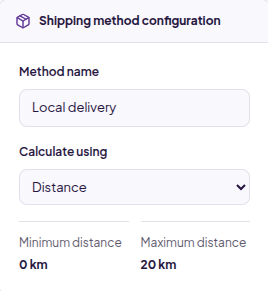
Shipping method configuration

Minimum distance

0 km

Maximum distance

20 km

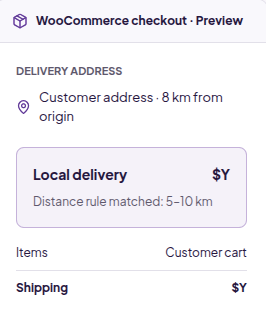
WooCommerce checkout · Preview

Delivery address

Customer address · 8 km from origin

Local delivery$Y

Distance rule matched: 5–10 km

Items
Customer cart
Shipping
$Y

Distance-Based Shipping

Calculate by customer distance

Weight-Based Shipping

Rates using cart weight

Conditional Rules

Products, categories and tags

Shipping Classes

Class-based extra charges

Multiple Methods

Different delivery options

Table-Rate Logic

Structured ranges and limits

Your business. Your rates.

Shipping costs should follow your business rules — not someone else’s

When you fulfil orders yourself, your shipping calculation should reflect your own delivery process.

  • Problem

    You deliver using your own vehicles or local delivery network.

    Solution

    Calculate shipping using customer distance instead of external carrier pricing.

    Feature used

    Distance-based rules

  • Problem

    Heavy orders cost more to deliver.

    Solution

    Set charges using minimum/maximum weight and weight ranges.

    Feature used

    Weight-based shipping

  • Problem

    Some products need different shipping rules.

    Solution

    Include or exclude methods using products, categories or tags.

    Feature used

    Product conditions

  • Problem

    Certain product types need extra delivery charges.

    Solution

    Apply additional charges using WooCommerce shipping classes.

    Feature used

    Shipping-class charges

  • Problem

    Pricing changes at different distances or weights.

    Solution

    Define table-rate style ranges and thresholds.

    Feature used

    Range-based pricing

  • Problem

    Some carts should qualify for free delivery.

    Solution

    Configure free-shipping conditions around your own rules.

    Feature used

    Free-shipping conditions

Distance-based delivery

Build your own distance-based delivery pricing

If your business handles delivery directly, calculate shipping based on how far the customer is from your configured origin. Define your own distance ranges and prices.

Distance is calculated using Google Distance Matrix API.

Google API usage and any applicable API charges are separate from the plugin license.

View distance setup details

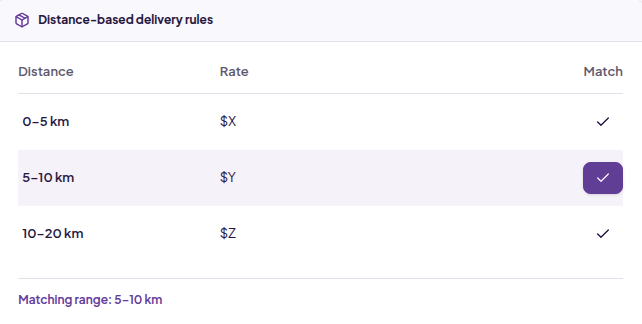
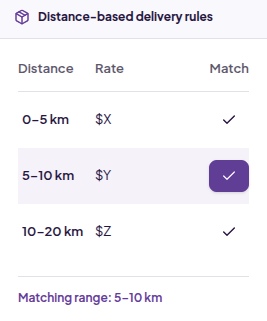
Distance-based delivery rules

Illustrative distance pricing ranges
DistanceRateMatch
0–5 km$X
5–10 km$Y
10–20 km$Z

Matching range: 5–10 km

Illustrative ranges and rates, not a live shipping quote.

  1. 01

    Customer Address

    The delivery destination

  2. 02

    Distance Calculation

    Google Distance Matrix API

  3. 03

    Matching Distance Rule

    Your configured ranges

  4. 04

    Shipping Cost

    The rate shown at checkout

Shipping rules

Build shipping calculations around how you actually fulfil orders

Choose how the rate is calculated, then apply the conditions and limits that fit your store.

01

Charge shipping based on how far the customer is from you

Use the customer’s delivery address and your configured origin to calculate distance through Google Distance Matrix API. Define the distance ranges, limits and fees your delivery operation uses.

  • Configured origin / store location
  • Minimum and maximum distance
  • Your own distance pricing ranges
02

Let heavier orders carry the right shipping cost

Calculate rates from total cart weight. Use structured ranges so charges change predictably as order weight increases.

  • Minimum and maximum weight
  • Weight-based ranges
  • Rates set by your business

03

Show or hide shipping methods based on what’s in the cart

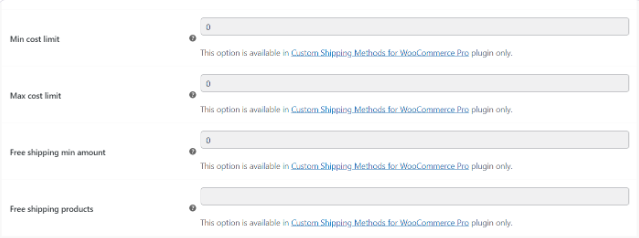
Control availability using individual products, categories and tags. Create appropriate options for oversized, fragile or local-only products. The original settings below show cost limits and free-shipping product controls.

  • Include or exclude products
  • Product-category conditions
  • Product-tag conditions

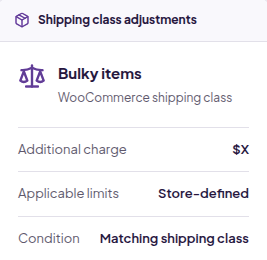
04

Add delivery charges for special product types

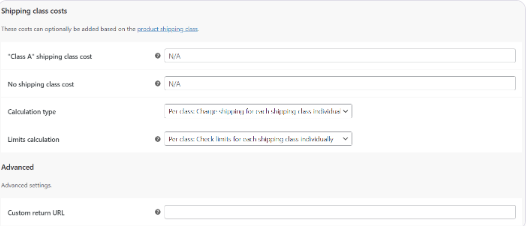
Use WooCommerce shipping classes to account for product types that cost more to deliver, with additional charges and store-defined limits.

  • Shipping-class adjustments
  • Additional class-based costs
  • Configured limits and conditions

More control over your shipping calculations

  • Multiple custom shipping methods
  • Distance-based shipping
  • Weight-based shipping
  • Cart-total conditions
  • Quantity-based rules
  • Volume-based rules
  • Product conditions
  • Product-category rules
  • Product-tag rules
  • Shipping-class charges
  • Minimum / maximum limits
  • Free shipping
  • Flat-rate shipping
  • Table-rate style pricing
  • Conditional method visibility

How it works

From shipping rule to checkout rate

  1. 01

    Create a shipping method

    Set its name and basic configuration.

  2. 02

    Choose the calculation

    Distance, weight, quantity, cart value or volume.

  3. 03

    Add conditions and limits

    Apply product, category, tag or shipping-class rules.

  4. 04

    Show the checkout rate

    WooCommerce evaluates the cart and customer location.

Range-based logic

Create predictable rates using ranges

Control exactly how charges change as distance or weight increases. Define the boundaries and rates that reflect your delivery costs.

Distance-based delivery rules

Illustrative distance pricing ranges
DistanceRateMatch
0–5 km$X
5–10 km$Y
10–20 km$Z

Matching range: 5–10 km

Illustrative ranges and rates, not a live shipping quote.

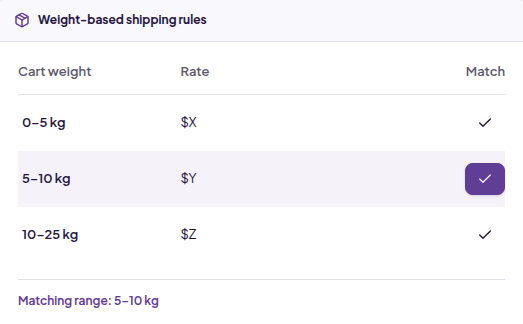
Weight-based shipping rules

Illustrative weight pricing ranges
Cart weightRateMatch
0–5 kg$X
5–10 kg$Y
10–25 kg$Z

Matching range: 5–10 kg

Illustrative ranges and rates, not a live shipping quote.

Use cases

Shipping rules for stores with their own fulfilment logic

Price delivery around your own local operation

For stores using their own vehicles, staff or delivery partners.

Capabilities used

  • Distance pricing
  • Min/max distance
  • Flat or range-based charges
  1. 1 Configure the delivery origin
  2. 2 Define distance ranges and prices
  3. 3 Set minimum and maximum distance
  4. 4 Show the matching rate at checkout

Method availability

Control when each shipping method is available

Shipping methods do not need to be global rates. Use product, category, tag, cart value, weight and distance conditions to match the order context.

Keep local-only products within your operating range, configure rules for oversized categories or apply limits for heavier carts.

Method availability · Product conditions

Product
Include / exclude selected products
Category
Oversized goods
Tag
Local delivery
Cart value / weight
Configured minimum and maximum
Distance
Within your delivery range

Illustrative conditions; no combined AND/OR behavior implied.

Inside WooCommerce

Configure shipping where you manage your store

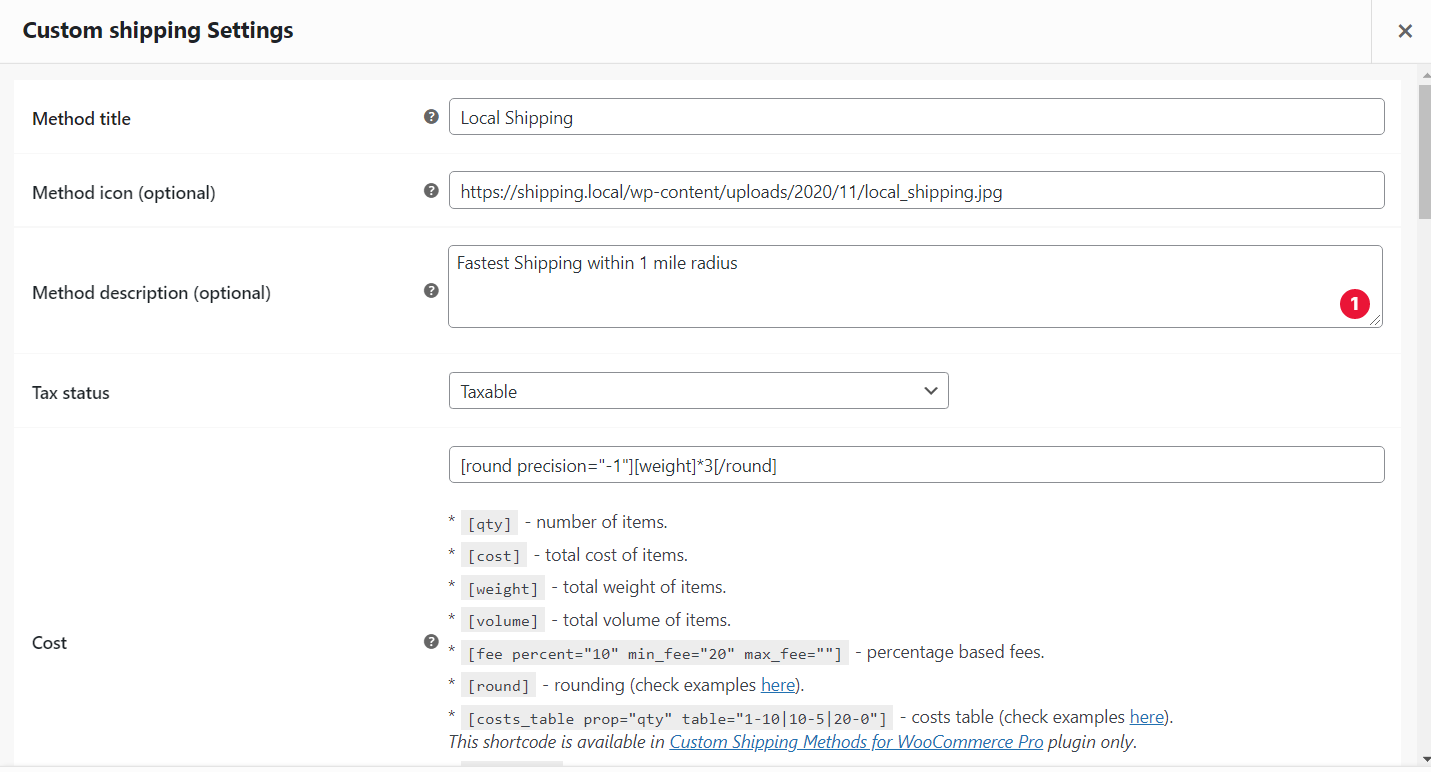
Original Custom Shipping Methods individual options admin screen

Original plugin interface · Open image for full-size view

Compatibility

Built for WooCommerce shipping workflows

WooCommerce
Compatible
Distance calculation
Google Distance Matrix API
Multiple shipping methods
Supported
WordPress tested up to
See current plugin metadata
WooCommerce tested up to
See current plugin metadata
Minimum PHP
See current plugin metadata

HPOS and Checkout Blocks compatibility are not claimed without verification.

Customer proof

Shipping rules backed by helpful support

“The plugin works wonderfully, and support was very timely and helpful when I needed it.”
Jenny Bublitz Owner, Bublitz Creative Original product-page review — https://imaginate-solutions.com/downloads/custom-shipping-methods-for-woocommerce/
“In addition to all that, i needed an extra option and these guys added it overnight, impeccable attention, friendly and fast.”
Yeray Moya, Freelance Web Developer Original product-page review · shortened excerpt — https://imaginate-solutions.com/downloads/custom-shipping-methods-for-woocommerce/

Pricing

Choose the license that fits your store

The same shipping-rule capabilities. Choose your site limit and annual or lifetime access.

1 Site

For one WooCommerce store

$29.99

per year

  • One year of updates
  • One year of support
  • Renew for continued support and updates
Buy Custom Shipping Methods

Unlimited Sites

For multiple stores and client projects

$79.99

per year

  • One year of updates
  • One year of support
  • Renew for continued support and updates
Buy Custom Shipping Methods

Try it with confidence

If the plugin does not meet your requirements, you can request a refund within 30 days of the original purchase according to the refund policy.

FAQ

Questions about Custom Shipping Methods

What is Custom Shipping Methods for WooCommerce?

A plugin for creating shipping methods and calculating charges using your store’s own delivery rules.

Can I create multiple shipping methods?

Yes. Configure different custom shipping methods for different delivery requirements.

Can shipping rates be calculated by distance?

Yes. Define distance ranges, minimum/maximum distance and your own rates.

How is customer distance calculated?

The current implementation uses Google Distance Matrix API with the configured origin and customer delivery address.

Does distance calculation use Google Maps?

It uses Google’s Distance Matrix API for distance calculation; the plugin does not provide its own mapping infrastructure.

Can I calculate shipping by weight?

Yes. Use cart/order weight to determine shipping rates.

Can I set minimum and maximum weight?

Yes. Weight limits help control when a method or range applies.

Can I create table-rate style shipping?

Yes. Define structured ranges and thresholds for predictable rate changes.

Can I control shipping by product or category?

Yes. Include or exclude selected products or categories.

Can I create rules using product tags?

Yes. Product tags can be used in shipping availability conditions.

Can I add charges based on shipping classes?

Yes. WooCommerce shipping classes support additional class-based charges.

Can I offer free shipping?

Yes. Configure free shipping around your store’s supported conditions.

Can I create flat-rate shipping?

Yes. Flat rates are supported alongside other calculation options.

Can I restrict shipping to a maximum distance?

Yes. Configure a maximum distance for distance-based shipping.

Is Google Distance Matrix API required for distance calculations?

Yes, for the current distance calculation implementation. Other calculation types do not depend on distance lookup.

Are Google API charges included with the plugin?

No. Google API usage and any applicable API charges are separate from the plugin license.

What support is included?

Annual licenses include one year of support and updates. Lifetime licenses include lifetime support and updates. Check the purchase page for the current renewal policy.

What is the refund policy?

A 30-day money-back guarantee applies to the original purchase according to the refund policy.

Technical information

Current version
See plugin details
Last updated
See plugin details
WordPress tested up to
See plugin details
WooCommerce tested up to
See plugin details
PHP requirement
See plugin details
Distance API
Google Distance Matrix API

Version and tested requirements are maintained by WordPress. This page links to current metadata; it does not connect a live version feed.

Related

More WooCommerce tools from Imaginate Solutions

Free Shipping Bar for WooCommerce

Show customers their progress toward free shipping.

View Plugin

Custom Payment Gateways for WooCommerce

Create payment methods for your store’s workflow.

View Plugin

Export Orders for WooCommerce

Send order data to fulfilment and reporting workflows.

View Plugin

Create shipping rates that match how your business actually delivers

Build WooCommerce shipping methods using distance, weight, quantity, cart value, volume and store-specific conditions.