
Skip to plugins

WooCommerce extensions trusted across 25,000+ websites.

Original Payment Gateways by User Roles product icon

WooCommerce Payment Control Plugin

Payment Gateways by User Roles for WooCommerce

Control WooCommerce payment gateways by customer role

Choose which payment methods each WordPress or WooCommerce user role can use at checkout — including default and custom roles, and standard or custom payment gateways.

  • Default and custom roles
  • Standard and custom gateways
  • First-role or all-role evaluation
  • 30-day money-back guarantee
ROLE → PAYMENT OPTIONS
Retail Customer
Order total$120.00

Payment method

  • Credit Card
  • PayPal
Checkout example · no transaction
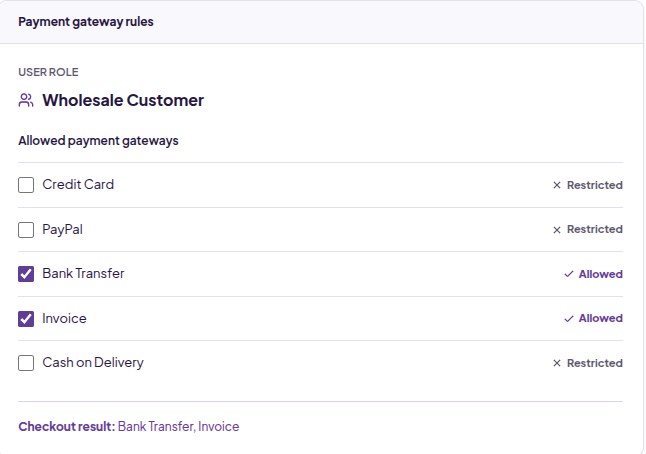
Wholesale Customer
Order total$120.00

Payment method

  • Bank Transfer
  • Invoice
Checkout example · no transaction
RoleAllowed gatewaysRelevant checkout

WordPress Roles

Default and custom roles

WooCommerce Gateways

Standard and custom methods

Role-Based Rules

Allow or restrict visibility

Multiple Roles

Choose evaluation scope

Checkout Control

Relevant payment options

Custom Role Support

Roles from other plugins

Problem → solution

Not every customer should see the same payment methods

Match your checkout to the customer, without replacing your existing payment setup.

  • Problem

    Wholesale payment options appear to retail customers.

    Solution

    Allow invoice and bank transfer only for the wholesale role.

    Feature used

    Role-based gateway rules

  • Problem

    Public customers can see staff-only Cash on Delivery.

    Solution

    Restrict COD to administrator or staff roles.

    Feature used

    Guest and staff workflows

  • Problem

    Your membership plugin creates custom customer roles.

    Solution

    Use those WordPress roles directly in your gateway rules.

    Feature used

    Custom role support

  • Problem

    Your store uses a custom payment gateway.

    Solution

    Control its availability alongside standard WooCommerce methods.

    Feature used

    Custom gateway support

  • Problem

    A customer has more than one assigned role.

    Solution

    Choose whether only the first role or all roles are considered.

    Feature used

    Multiple-role evaluation

Payment control

Control payment options without changing your gateway setup

This plugin controls access to existing payment methods. It does not create new gateways or process payments.

01

Choose which roles can use each payment method

Configure gateway availability using role-based allow and restrict rules. Keep account-based methods for wholesale customers and online methods for public checkout.

  • Allow payment gateways by role
  • Restrict payment gateways by role
  • Support guest and logged-in checkout
02

Works with the payment gateways your store already uses

Control payment methods registered with WooCommerce, rather than choosing from a fixed list of supported methods.

  • Standard WooCommerce payment gateways
  • Custom payment gateways
  • Gateways added by WooCommerce extensions

03

Use any WordPress role in your checkout rules

Use default WordPress roles, WooCommerce customer and shop roles, or custom roles created by other WordPress plugins.

  • Default WordPress and WooCommerce roles
  • Membership and wholesale role workflows
  • Custom roles already on your site

04

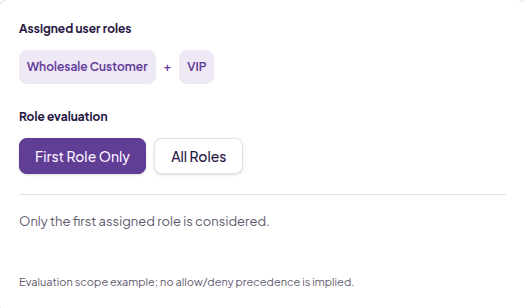
Decide how users with multiple roles are evaluated

Choose whether the plugin considers only the first role or all assigned roles when evaluating your gateway rules.

  • First role only
  • All assigned roles
  • Test combined role rules for your store

Focused checkout capabilities

  • Allow gateways by role
  • Restrict gateways by role
  • Standard WordPress roles
  • Custom WordPress roles
  • Standard WooCommerce gateways
  • Custom payment gateways
  • Multiple-role evaluation
  • Guest checkout workflows
  • Wholesale payment workflows
  • Staff-only payment methods

How it works

From user role to checkout payment options

  1. 01

    Choose a user role

    Select the WordPress or WooCommerce role you want to control.

  2. 02

    Choose payment gateways

    Allow or restrict existing gateways for that role.

  3. 03

    Set role evaluation

    Choose first-role or all-role evaluation when needed.

  4. 04

    Match the checkout

    Customers see the payment methods allowed by your rules.

User RoleGateway RulesWooCommerce Checkout

Use cases

Useful wherever customer types need different payment options

Account-based payments for wholesale customers

Keep invoice and bank-transfer methods for wholesale roles while retail customers pay online.

Capabilities used

  • Role-based gateway visibility
  1. 1 Wholesale customer signs in
  2. 2 Gateway rules evaluate the assigned role
  3. 3 Checkout shows bank transfer or invoice

Before → after

Simplify checkout by showing only relevant payment methods

Fewer irrelevant choices. Payment options that match the customer type.

Before · Every customer

All customers
Order total$120.00

Payment method

  • Credit Card
  • PayPal
  • Bank Transfer
  • Invoice
  • Cash on Delivery
Checkout example · no transaction

After · Retail customer

Retail Customer
Order total$120.00

Payment method

  • Credit Card
  • PayPal
Checkout example · no transaction

After · Wholesale customer

Wholesale Customer
Order total$120.00

Payment method

  • Bank Transfer
  • Invoice
Checkout example · no transaction

Gateway support

Works with standard and custom WooCommerce payment gateways

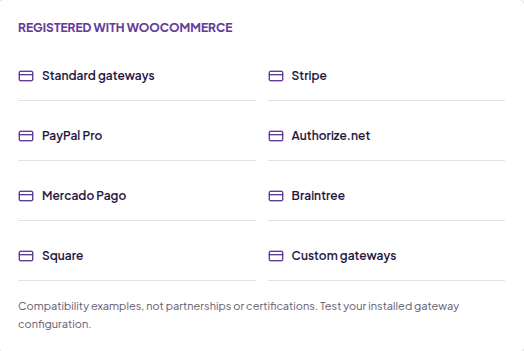
The plugin controls payment methods registered with WooCommerce. It is not a payment processor and is not limited to a fixed list of gateways.

The current product page lists tested examples including Stripe, PayPal Pro, Authorize.net, Mercado Pago, Braintree and Square. These names do not imply certification or partnership.

REGISTERED WITH WOOCOMMERCE

  • Standard gateways
  • Stripe
  • PayPal Pro
  • Authorize.net
  • Mercado Pago
  • Braintree
  • Square
  • Custom gateways

Compatibility examples, not partnerships or certifications. Test your installed gateway configuration.

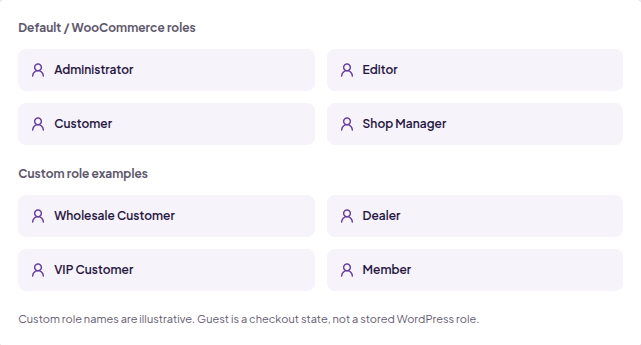
Default / WooCommerce roles

  • Administrator
  • Editor
  • Customer
  • Shop Manager

Custom role examples

  • Wholesale Customer
  • Dealer
  • VIP Customer
  • Member

Custom role names are illustrative. Guest is a checkout state, not a stored WordPress role.

User role support

Works with the roles already on your WordPress site

Use default WordPress and WooCommerce roles or custom roles created by other WordPress plugins.

Wholesale Customer, Dealer, VIP Customer and Member are illustrative custom roles. The role names available on your store depend on its configuration.

Customer stories

Real checkout requirements. A focused solution.

“All I needed was some way to make sure logged in users (just our admin staff) could take COD payments while Guest users (the general public) could only use credit cards for online payments. This plugin does that very simply, it’s working perfectly, and I couldn’t be happier!”
Webby Founder, The Tangled Webby Staff COD / public online payments · Shortened excerpt
“Great plugins, does exactly what it says and more.. Outstanding support, quick and resourceful : ) Thanks to Dhruvin and his team!”
Georges Langeard, Founder, Agence.Guru Product-page review excerpt
Original product reviews: https://imaginate-solutions.com/downloads/payment-gateways-by-user-roles-for-woocommerce/

Pricing

Choose the license that fits your store

Annual or lifetime access, for one site or your full store portfolio. Prices in USD.

Try it with confidence

30-day money-back guarantee. If the plugin does not meet your requirements, request a full refund within
30 days of the original purchase, according to the refund policy.

FAQ

Questions about role-based payment control

What does Payment Gateways by User Roles do?

It controls which existing WooCommerce payment gateways are available to customers based on their user roles.

Can I control any WooCommerce payment gateway?

The plugin supports standard and custom payment gateways registered with WooCommerce. Test your installed gateway configuration before deploying rules.

Does it work with custom payment gateways?

Yes. It can control custom WooCommerce gateways as well as standard gateways.

Does it support Stripe and PayPal?

The product page lists tested gateway examples including Stripe and PayPal Pro, alongside Authorize.net, Mercado Pago, Braintree and Square. These are not partnerships or certifications.

Can I use roles created by other plugins?

Yes. Custom WordPress roles created by membership, wholesale or other plugins are supported.

Does it support custom WordPress roles?

Yes, alongside default WordPress and WooCommerce roles.

Can wholesale and retail customers see different gateways?

Yes. Configure gateway availability by role, for example invoice for wholesale customers and online card payments for retail customers.

Can I restrict Cash on Delivery to store staff?

Yes. Use administrator or staff roles to control access to an existing COD gateway and exclude public customers.

What happens if a user has multiple roles?

The plugin provides first-role-only or all-role evaluation. Test your combined role rules; no unverified allow/deny conflict precedence is implied here.

Can I choose whether the first role or all roles are evaluated?

Yes. Select the role-evaluation behavior that matches your store requirements.

Does the plugin create new payment gateways?

No. It controls existing gateways. Custom Payment Gateways for WooCommerce is the separate plugin for creating custom/manual payment methods.

What support is included?

Annual licenses include one year of updates and support. Lifetime licenses include lifetime updates and support. Confirm current purchase and renewal terms on the original purchase page.

What is the refund policy?

A full refund can be requested within 30 days of the original purchase, according to the refund policy.

Technical information

Current version
See current release
Last updated
See latest release date
WordPress tested up to
See current plugin listing
WooCommerce tested up to
See product release details
PHP requirement
See current plugin requirements
Role support
Default and custom WordPress roles
Gateway support
Standard and custom WooCommerce gateways
Multi-role behavior
First role only / all roles

Version and compatibility change over time. Follow the source links for current details; these are not a live metadata feed.

Related plugins

More WooCommerce tools from Imaginate Solutions

Works well with Custom Payment Gateways

Custom Payment Gateways for WooCommerce

Create custom/manual payment methods, then use role rules to control who can see them.

View Plugin

Custom Shipping Methods for WooCommerce

Build shipping calculations around your store’s rules.

View Plugin

WooCommerce Export Orders

Export order data for fulfilment and reporting.

View Plugin

Show the right payment methods to the right WooCommerce customers

Control gateway availability using WordPress user roles and keep checkout relevant for retail, wholesale, staff and custom customer types.